
How to Increase YouTube Watch Time in 2025: 7 Proven Strategies
- 28 Oct, 2025
Why Watch Time Matters More Than Views in 2025
YouTube shows more of your videos when people keep watching and feel satisfied. The fastest wins are simple: help viewers watch a second video, make talking in comments fun, add timestamps so bored viewers jump to the next part, and guide people into playlists. Do these well and your watch time and discovery will grow.
We'll cover the following methods:
- Create ‘Binge sessions’
- Make the comment section fun
- Master timestamps
- Leverage playlists
- Use Emotions in Titles & Thumbnails
- Fix your Watch Retention
- Use Info Cards strategically
Lead viewers into binge sessions
A binge session is when a viewer watches two or more of your videos in a row. Set up a two-tile end screen: Latest video and Best for viewer. Say out loud what to click, then roll the end screen.
Add the same next step in your top description line:
‘Next, watch: {insert video title and link}.
End screens appear in the last 5 to 20 seconds and can promote videos or playlists. Note that viewers can now hide end screens, so it's best to announce the video you're about to callout a few seconds before the end screen starts.
Say something like this:
Click on these cards or on the video linked at the top of the description to learn about {insert topic you want to viewers to watch next}.
Make the comment section fun
Comments help build community and send positive engagement signals to YouTube's algorithm. You need to be creative when you prompt your viewer to comment below. Don't just say ‘Please don't forget to like, subscribe and comment’, nobody responds well to this. Instead, try some of these:
-
If your video is a tutorial, say something like: ‘if you're stuck at a part of this tutorial, drop the timestamps plus your question in a comment and I'll be there to help.'
-
If you are sharing tips or advice in your videos, try something like that: ‘Share one tip that worked for you in one sentence so we can all learn even more from this video.'
-
Great for food recipes, DIY and similar type of content: ‘Tell us how it went in the comment after you tried it.'
-
If you're presenting options or various scenarios in your video, ask your viewers to vote: ‘Let us know in the comments which approach you would follow and explain why in one sentence.'
-
The 24-hour challenge, great for health tips or productivity content: ‘Try this in the next 24 hours and report back how you felt.'
Pin your question as the first comment and reply fast. If viewers keep your video playing while they read and comment, that time adds to your watch time, and every second adds up.
Master timestamps
Timestamps act as tiny doors in your video. Some creators hate them because they allow people to easily skip ahead and not watch the whole video. But if you think about it for a second, it's best to let your viewer skip ahead and continue watching other parts of your content, rather than have them drop off and start watching another video. So add chapters by placing timecodes in your video description.
In practice, how does it work?
Add lines like in the example below where 00:00 = the start of the video, 01:12 = one minute and 12 seconds in etc. One chapter per line, starting with the time code.
00:00 Intro
01:12 Step 1
03:40 Pro tips
When someone gets bored, they will try the next chapter before bouncing.
Leverage Playlists
The right sidebar can tempt viewers away. Group related videos into a playlist and send people there from your end screen, description, and pinned comment. Playlists make it easy to keep watching your content.
Quick setup: Create a playlist per topic, put your strongest video, ranked by viewer retention (Creatipi can highlight this for you) first, and mention the playlist in your video and end screen.
Use Emotions in Titles & Thumbnails
A good title gets the first click. Science has proven multiple times that emotional triggers are great are getting people to click. If you need ideas, see our guide to emotional triggers in YouTube titles for safe, repeatable patterns.
Peer-reviewed research shows that emotional cues capture attention by increasing arousal and biasing perception toward what feels important, which is why high-arousal content consistently drives stronger engagement online. From PubMed, How the Brain Behaves: Neural Mechanisms and Emotional Attention.
Creatipi has a built-in video title generator powered by AI and trained on thousands of video outliers. That will be a great start to get more views and more watch time. Try it in the app. You can read more about this feature and see it in action here.
Pro tip: it's not too late to change the titles of your older videos. We've seen older videos starting to get views again after a title or thumbnail change. This is super powerful for videos that are found via the search bar.
Fix your Watch Retention
Analyze your viewer retention and identify moments in your videos where viewers drop off. Rewatch these parts of your content and try to think about ways you could have improved these parts.
Often it will come down to:
- Boring parts or filler content
- Repetitive content
- Bad editing or poor audio
- Content that deviates from the promise of the video
Use Info Cards strategically
Once you get initial retention data for your video (usually 72 hours after the video is made available to your viewers), look up any dips in your retention and place a card right before a known drop to offer a tighter, related video or a playlist. Cards are interactive links that keep viewers inside your content.
This way, you give some of your viewers a chance to click and start watching another video of yours instead of dropping off to other videos you don't own.
Here's an example of when an Info Card could be quite useful.
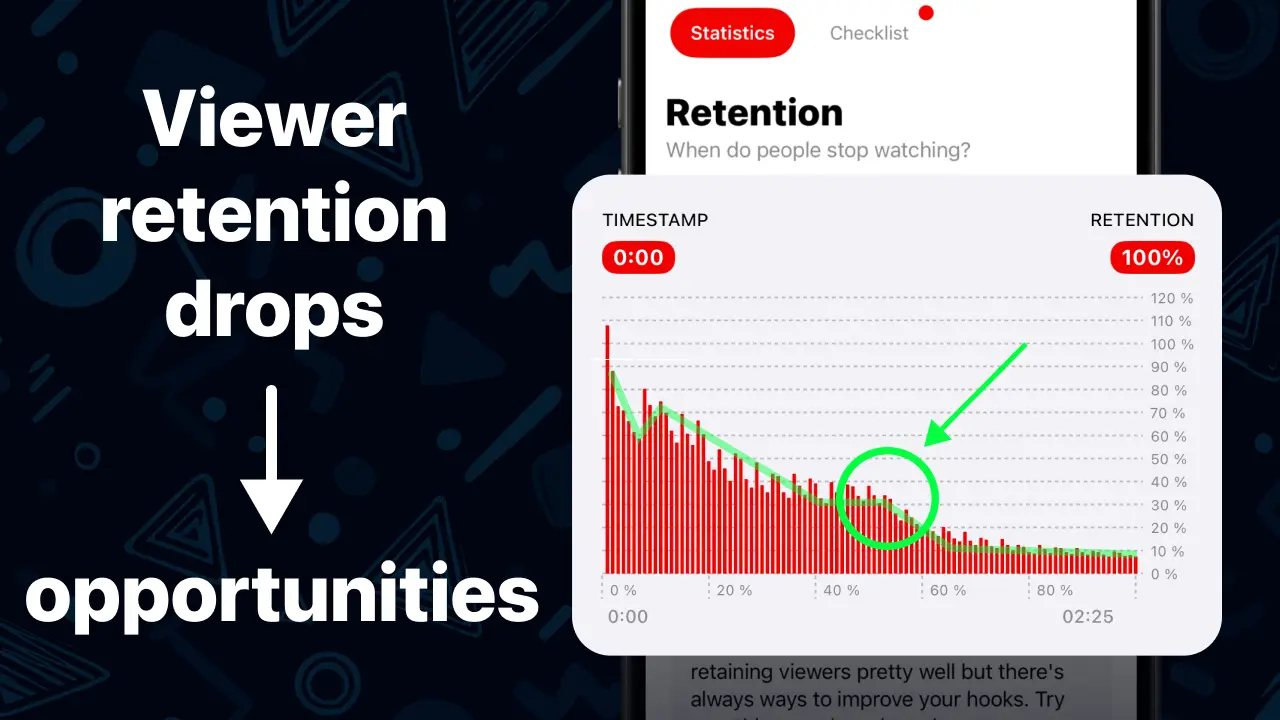
You see how at this moment, the viewer's retention drops. Many people seem to stop watching the video at this moment. This is an opportunity to do two things:
- Use an info card to send viewers to another video of yours.
- Reflect on why this moment of your video was less engaging so you can learn to not repeat the same mistake in future videos.
Let's sum it up with a quick checklist you can use today
- Add a two-tile end screen: Latest video + Best for viewer.
- Put “Next, watch: {video title or playlist}“ in line 1 of your description.
- Pin a playful comment and direct your viewers to it in your content.
- Add chapters in the description starting at 00:00.
- Create a topic playlist and link to it from end screens and comments.
- Use emotional triggers in your titles.
- Analyze your viewer retention to find drops you can leverage to send viewers to your other videos.
Take these small steps, keep them consistent, and your watch time will grow with every upload.
–––

Ed (Creator of Creatipi)
YouTuber since 2018 • Built Creatipi to help creators track growth, beat algorithms, and earn more.
Pro tip: I use Creatipi daily to grow my own channel. These strategies? Tested on real videos — not theory.